
8MBets Withdrawal represents the vital final stage of your gaming sequence, seamlessly converting your strategic sports predictions and digital slot winnings into physical financial liquidity. The streamlined cash-out console at 8MBets is engineered around advanced data encryption protocols to guarantee absolute transactional safety. By managing your outgoing capital requests with precision, the platform eliminates unnecessary pending times and holding loops. This operational efficiency ensures a direct, uniform experience whether you access your vault from a desktop or a mobile screen, allowing you to secure your payouts with complete confidence.
Technical Overview Of The Integrated Dashboard Cash-Out Terminal
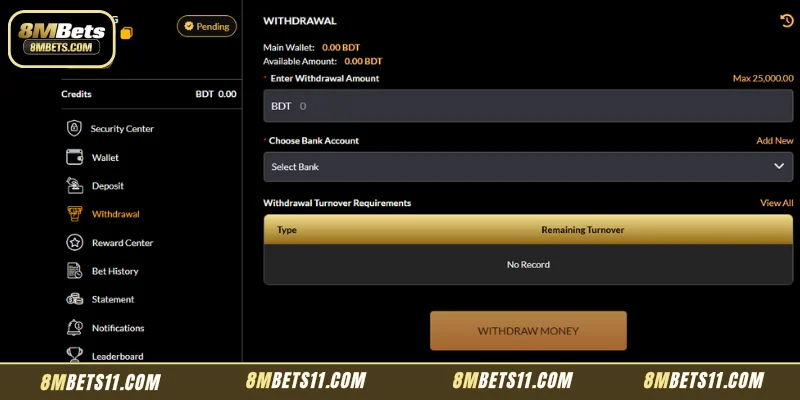
The specialized cash-out interface presents an organized, highly data-transparent overview designed to keep players informed of their exact financial standing before a transaction begins. To launch an 8MBets Withdrawal, log into your active user profile, find the dark-themed main account navigation bar on the left side of the screen, and click the dedicated Withdrawal tab.
Real-Time Balance Disclosures
Before typing an extraction amount, the terminal prominently reveals two essential balance variables situated at the top of the processing column:
- Main Wallet Display:This indicates your total raw account capitalization metric including locked promotional variables or ongoing bet settlements (Main Wallet: 0.00 BDT).
- Available Amount Metric:This line displays the explicit, cleared financial allocation that is fully eligible for immediate transfer (Available Amount: 0.00 BDT).
Operational Transaction Boundaries
The entry portal actively enforces predefined processing parameters to safeguard system liquidity. The system explicitly declares an upper ceiling capped at Max 25,000.00 BDT per single validation request. Ensure your numeric entry complies with this parameter string to bypass automated validation errors.
Step-By-Step Blueprint To Execute An 8MBets Withdrawal
Processing your 8MBets Withdrawal requires moving through a secure, structured input sequence to ensure that funds travel safely into your verified personal financial account. Follow this operational layout from the 8MBets Guide to complete your transaction without technical friction:
Step 1: Inputting Your Precise Target Extraction Value
Locate the field labeled Enter Withdrawal Amount. Click into the gray input bar to type the exact numeric value you wish to pull from your cleared available balance sheet. The base field operates exclusively with valid numbers and automatically links with your primary BDT wallet configuration.
Step 2: Binding And Selecting Your Local Banking Account
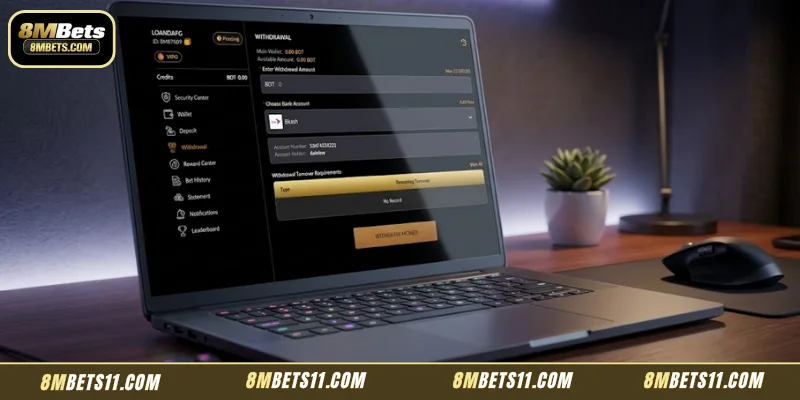
Directly underneath the balance input box, you will find the section designated as Choose Bank Account. To connect a new destination network for your payout, click the highlighted Add New hyperlink located on the right side of the box header. This opens a configuration module where you can securely input your financial institution name, branch data, and exact account number. Once saved, simply press the Select Bank drop-down menu to pick your target destination.
Step 3: Verifying Outstanding Turnover Requirements
To uphold regulatory anti-money laundering standards and operational clarity, the portal displays a dedicated table titled Withdrawal Turnover Requirements. If you have activated promotional packages (such as a reload bonus or slot match incentive), any outstanding wagering volume will reflect inside this column. If your profile is completely clear of promotional commitments, the terminal will cleanly report a No Record statement, signaling that your funds are fully eligible for processing.
Step 4: Transmitting The Final Server Handshake Request
Once every required text line is completed, review your financial details one last time. Hover over and click the solid, golden-brown button labeled WITHDRAW MONEY at the base of the portal. This action instantly signs your request with security keys and sends it to the central ledger team for validation.
Critical Factors Controlling Transaction Processing Speeds
To maximize your 8MBets Withdrawal efficiency and avoid localized delays, it is important to understand the automated review phases that govern your account data behind the scenes:
- Security Verification Status:Profiles featuring a fully finalized verification badge move through the automated review loop significantly faster. Ensure your registered identity traits are validated beforehand.
- Banking Network Hours:Standard mobile wallet paths process transactions nearly instantly, but traditional banking networks might encounter localized clearing windows over weekends or official holidays.
- Turnover Compliance Alignment:If the system detects incomplete wagering criteria from an active bonus pack, the processing node will automatically pause the request until those specific conditions are met.
Essential Guidelines For Flawless Capital Protection
Maintaining rigid profile security is vital to ensuring that your hard-won balances always route exclusively to your personal pocket. Implement these proven operational habits to ensure a secure 8MBets Withdrawal during every cash-out session:
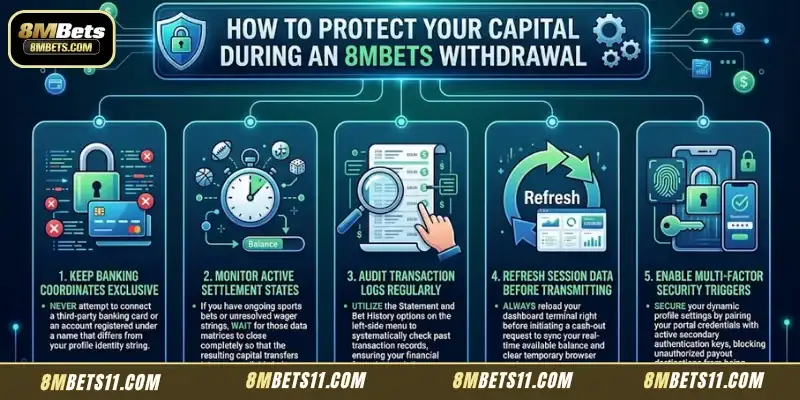
- Keep Banking Coordinates Exclusive:Never attempt to connect a third-party banking card or an account registered under a name that differs from your profile identity string.
- Monitor Active Settlement States:If you have ongoing sports bets or unresolved wager strings, wait for those data matrices to close completely so that the resulting capital transfers into your available balance.
- Audit Transaction Logs Regularly:Utilize the Statement and Bet History options on the left-side menu to systematically check past transaction records, ensuring your financial footprint is pristine.
- Refresh Session Data Before Transmitting:Always reload your dashboard terminal right before initiating a cash-out request to sync your real-time available balance and clear temporary browser cache errors.
- Enable Multi-Factor Security Triggers:Secure your dynamic profile settings by pairing your portal credentials with active secondary authentication keys, blocking unauthorized payout destinations from being bound to your portal.
Conclusion
In conclusion, an 8MBets Withdrawal provides a structured, remarkably secure, and completely professional transaction portal designed to deliver your funds with optimal efficiency. By centralizing vital information—including real-time BDT balances, bank account selectors, and transparent turnover verification tables—the platform ensures maximum clarity throughout every phase. The simple step-by-step data submission path allows players to manage their capital with peace of mind. Move through the official payout terminal with total confidence and enjoy your gaming journey at 8MBets.