An 8MBets Deposit serves as your primary tactical gateway to funding your personalized gaming hub and accessing high-grade global sports betting markets. Built around top-tier speed and absolute data encryption standards, the portal integrates specialized regional wallet networks and decentralized crypto pathways to process incoming transactions instantly. Operating fluidly across responsive mobile screens and desktop layouts, the interface maintains complete transparency. Navigate the banking framework confidently, select your optimal channel, and claim elite welcome incentives today at 8MBets.
Detailed Step-By-Step Guide For Every Available 8MBets Deposit Method
The administrative interface streamlines funding by connecting with the most prominent regional digital mobile wallets and decentralized financial gateways. To process an 8MBets Deposit successfully by following the official 8MBets Guide, navigate to the dark-themed primary dashboard panel, click on the highlighted transaction tab on the left-side menu, and select your preferred payment integration from the four primary channels available.
Instant Funding Via Bkash Gateway
The first available method utilizes the highly integrated Bkash digital platform, which remains a primary option for quick wallet transfers.
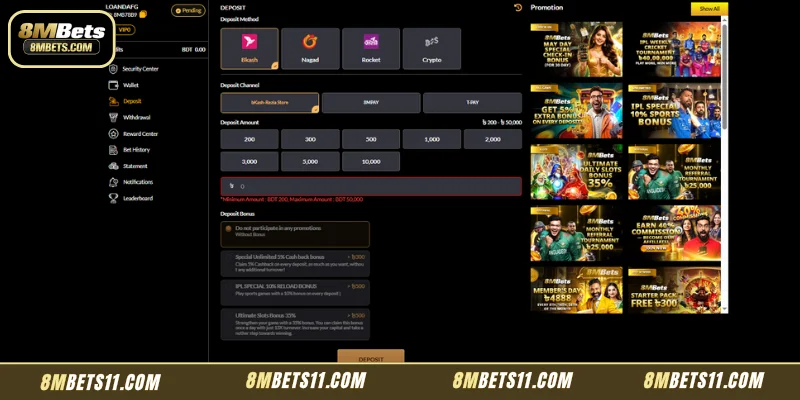
- Selecting Your Dedicated Deposit Channel:The system divides the processing pipeline into three individual transaction routes: 8MPAY, bKash-GORIBE NEWAZ TRADERS, and T-PAY. Select the specific routing network that matches your immediate connection speed.
- Choosing Your Target Funding Amount:The interface offers a multi-tier quick selection grid containing predefined values including 200, 300, 500, 1,000, 2,000, 5,000, 10,000, 20,000, and 30,000. Alternatively, you can type your exact capital requirement manually into the primary input block.
- Adhering to System Limits:Every single transaction path operates within precise, strict boundaries. The platform mandates a clear minimum allocation barrier of BDT 200 and a maximum upper ceiling capped at BDT 30,000 per individual funding sequence.
Processing Capital Through Nagad Wallets
Below is the precise step-by-step breakdown for the Nagad payment gateway based strictly on the updated system interface layout:
- Selecting The Dedicated Deposit Channel:Once you toggle the Nagad payment method icon, the system displays three active routing channels tailored for this gateway: 8MPAY, Nagad-M/S Anonto Pharmacy, and T-PAY. Click on your preferred routing option to establish a secure link.
- Selecting Or Customizing Your Funding Value:You can quickly set your transaction value by clicking one of the predefined amount blocks: 200, 300, 500, 1,000, 2,000, 5,000, 10,000, 20,000, or 30,000. If you require a unique variation, you can type the manual integer straight into the lower allocation row displaying the currency symbol.
- Adhering To Transaction Limits:The validation field enforces strict system-wide operational limits for Nagad. Any transaction submitted must strictly comply with the minimum allocation requirement of BDT 200 and must not exceed the maximum cap of BDT 30,000.
- Selecting Your Preferred Deposit Bonus:Before hitting the final transaction trigger, scroll down to check or uncheck your active promotional incentives.
- Executing The Final Server Handshake:After double-checking that your input configurations exactly match your external wallet balance capabilities, click the solid golden-brown DEPOSIT button at the base of the terminal to route your request to the data cluster.
Executing Transfers Using The Rocket Mobile Network
The third option inside the dynamic banking module links directly with Rocket accounts, ensuring absolute flexibility for diversified mobile banking clients.
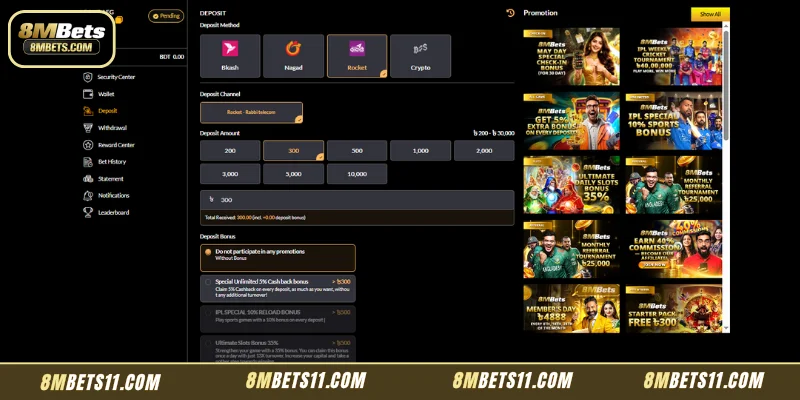
- Selecting The Dedicated Deposit Channel:Once you toggle the Rocket payment method tab, the system displays the active dedicated routing channel for this network: Rocket – Rabbi telecom. Click this routing box to ensure your transfer is properly tracked.
- Selecting Or Customizing Your Funding Value:You can quickly choose a transaction amount by clicking one of the predefined quick-pick blocks: 200, 300, 500, 1,000, 2,000, 3,000, 5,000, or 10,000. If you wish to allocate a specific amount, enter the value manually in the input bar displaying the currency indicator.
- Adhering To Transaction Limits:The validation parameters enforce strict guidelines for Rocket transactions. The platform mandates a minimum transfer value of BDT 200 and caps the maximum upper limit at BDT 30,000 per individual funding session.
- Selecting Your Preferred Deposit Bonus:Before initiating the transfer handshake, select your desired promotion from the list at the bottom.
- Executing The Final Transfer Handshake:After validating that your chosen layout configuration matches your mobile wallet balance capabilities perfectly, press the golden-brown DEPOSIT button at the base of the portal to securely finalize the transaction.
Decentralized Crypto Token Funding Pathways
For modern players looking for maximized global security, zero regional constraints, and absolute identity protection, the system includes a dedicated decentralized node.
- Selecting The Dedicated Deposit Network:Once you toggle the Crypto payment method icon, the interface updates to support decentralized ledgers. Under the Select Network section, click the active block labeled USDT(TRC20) to establish your transfer pipeline.
- Inputting Your Specific Funding Value:In the Enter Deposit Amount input bar, type your manual fiat equivalent balance metric next to the BDT indicator.
- Reviewing The Dynamic Currency Rate:The interface instantly displays a real-time tracking variable underneath the input row labeled Currency Rate (for example, 44). The system uses this exact equation balance to convert your incoming token transmission into your native currency profile.
- Adhering To Crypto Transaction Limits:The validation fields for decentralized funding paths enforce a significantly larger operational window compared to standard mobile banking paths. The platform mandates a clear minimum allocation barrier of BDT 500.00 and unlocks a massive upper ceiling capped at BDT 500,000.
- Extracting The Secure Wallet Address Parameters:To finalize your transfer, utilize one of the two integrated transaction options presented in the lower destination container: Scanning The Live QR Code and Copying The Explicit Address String.
- Waiting For Complete Network Validations:After initiating the manual transfer from your external private wallet application, the system displays a clear warning note at the base. To ensure total transaction security, the capital will undergo exactly 12 network confirmations across the blockchain nodes before reflecting inside your central gaming balance.
Crucial Tips To Ensure A Successful 8MBets Deposit Every Time
To safeguard your capital and maintain an completely frictionless account ecosystem over time, always apply these industry-leading operational guidelines:
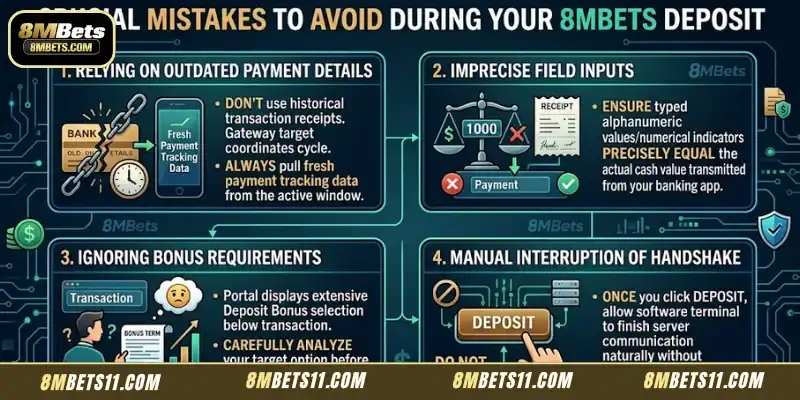
- Always Verify Live Account Details:Financial gateway target coordinates can cycle periodically due to system load balancing. Always pull fresh payment tracking data directly from the active window rather than relying on historical transaction receipts.
- Match Input Fields Exactly:Ensure the alphanumeric values or numerical indicators typed into the manual entry rows precisely equal the actual cash value transmitted through your external banking application.
- Review Attached Bonus Requirements:Below the transaction parameters, the portal displays an extensive Deposit Bonus selection area. Carefully analyze your target option before proceeding.
- Avoid Refreshing Active Handshake Pages:Once you click the central golden-brown confirmation element labeled DEPOSIT, allow the software terminal to finish communicating with the server cluster naturally without manual interruption.
Conclusion
In summary, executing an 8MBets Deposit provides a completely secure and professional banking environment tailored for rapid capitalization. By deploying distinct funding channels—spanning Bkash, Nagad, Rocket, and decentralized Crypto systems—the portal guarantees seamless processing for every player. Integrated transaction thresholds and optional promotional bonuses allow you to scale your gaming capital with complete transparency. Navigate the official financial interface with absolute confidence to elevate your entertainment experience today at 8MBets.